


How do I track a prospect and the next follow-up from Customers?
When sales follow-up is enabled, the Customers list also includes prospects. The sales stage describes how the relationship is progressing; the next contact date identifies when to follow up.
Find the prospects to follow up
Open Customers / Matters > Customers. Display the sales stage and next contact columns, then filter by stage, responsible person or date. An old prospecting bookmark may return to this list: apply the filters you need.
Update the relationship and next action
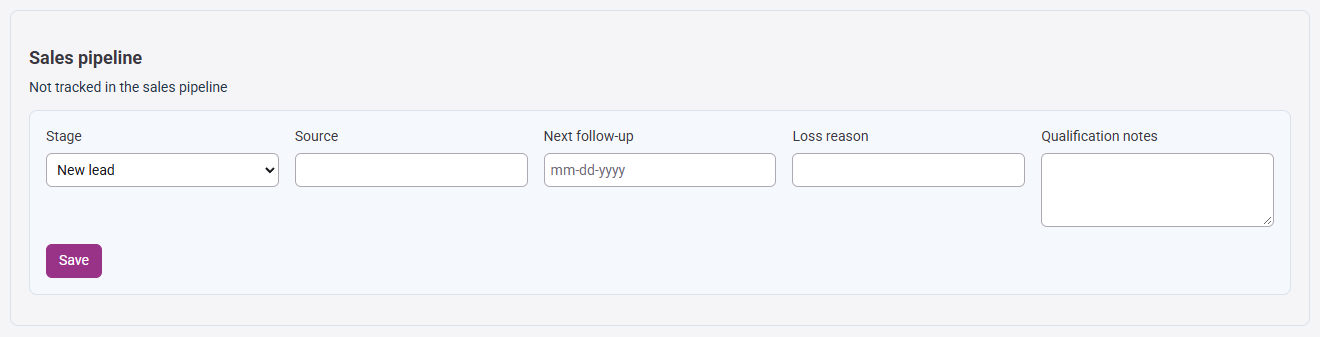
Open the customer follow-up, then the sales follow-up section. Choose a stage that reflects your exchanges, enter the source, a useful note and the next contact date. For a lost prospect, enter a reason. Save, then find the record in the list with its stage and date.
Onboarding and active customer stages are controlled by their workflow. You cannot force them through sales follow-up. During an engaged workflow or a signature in progress, the stage may be protected while notes and the next contact date remain editable.
Investigate a missing record or protected stage
- Prospect missing: check presence filters, stage, company and your access scope.
- Follow-up missing: have feature activation and your access rights checked.
- Save refused: review loss reason, date and stage; if the record has changed, reload it before trying again.
Continue with preparing and activating a customer file and engagement letters.