


How do I document PEP, sanctions and false-positive checks?
A PEP is a natural person exposed through functions defined by the applicable rules, including relevant relatives and associates. A company is not itself a PEP. PEP status does not mean sanctions apply or an offence occurred.
Record actual searches
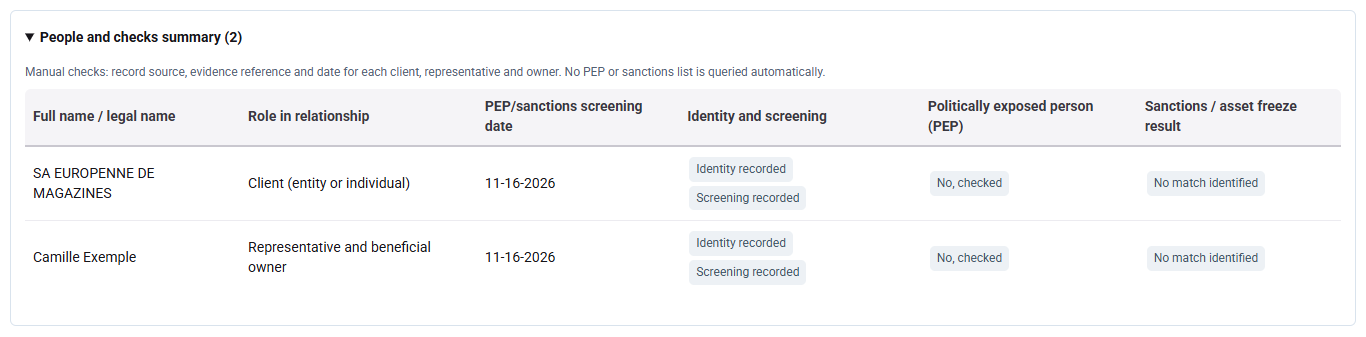
Expand People and checks summary to review the recorded roles, dates and results. To complete or correct a search, open the corresponding person in the preparation; submitted or approved files show their preparation under Information and evidence reviewed.
For each person or entity, enter the source, evidence reference and search date. Select PEP and sanctions results after a real check: Tempolia does not search names. The summary shows recorded controls and anomalies, not certified results.
Resolve a potential match
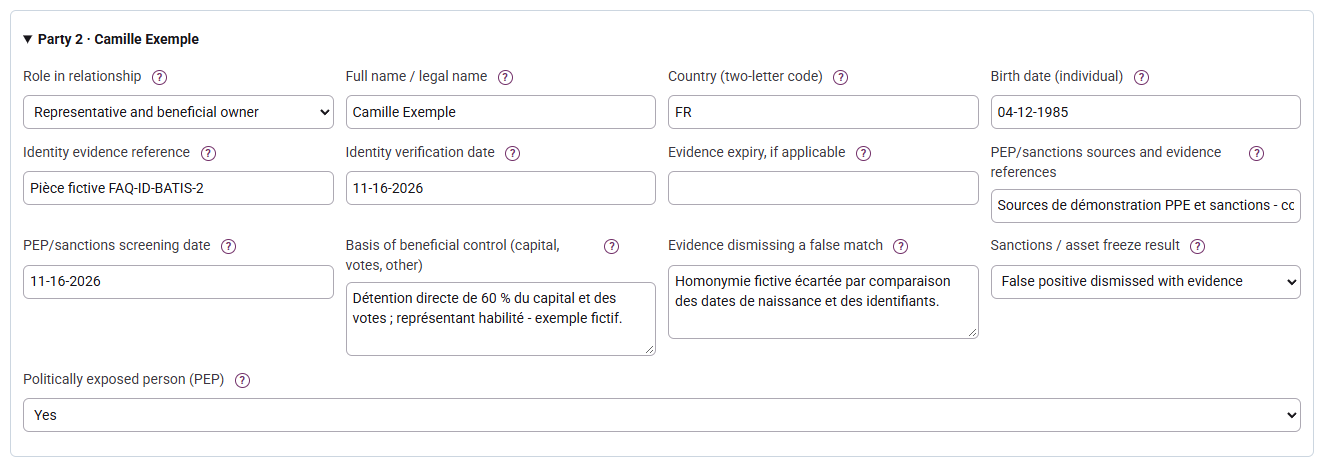
A potential or confirmed match blocks approval in the workflow. Examine identifiers and sources; for a false positive, choose the dismissed result and provide at least twenty characters of reasoning. Do not select “no match” to bypass an unchecked alert. Searches must meet the configured freshness at submission and decision, thirty days by default.
Complete the PEP case
A PEP sets high risk in Tempolia: document funds, wealth, enhanced measures and monitoring, then seek a different authorised approver. The PEP decision belongs to an executive or a person specifically authorised for that purpose. Report later events through ongoing monitoring.
