


Help - Questions / Answers
AML / CFT
- Which French AML/CFT duties does Tempolia help you monitor?
- How do I prepare identification and supporting evidence for an AML file?
- How do I record beneficial owners and representatives in an AML file?
- How do I assess AML risk and read Tempolia’s radar?
- How do I document PEP, sanctions and false-positive checks?
- How do I submit, approve, reject or reopen an AML file?
- How do I monitor AML reviews, deadlines and vigilance events?
- How do I retain, review and export AML evidence?
- How do I prepare the firm’s French AML exposure questionnaire with Tempolia?
In France, AML/CFT concerns money laundering and terrorist financing. Its framework includes the Monetary and Financial Code and rules specific to the professions concerned; it is not a single “AML law”.
Which organisations are concerned?
- Accountants: they are subject to French AML/CFT duties and apply, in particular, the NPLAB professional standard to organise due diligence, risk assessment and client monitoring.
- Lawyers: duties apply to the activities listed in Article L. 561-3, including certain property or financial transactions, company formation or management and tax advice. Judicial proceedings and legal consultations benefit from exceptions, particularly for suspicious transaction reporting, under the conditions set out in that article. When a report is required, it goes through the president of the bar (bâtonnier).
- IT services companies (ESN) and engineering consultancies: providing IT, consulting or engineering services does not, on its own, make them subject to AML/CFT duties. Check whether an activity actually carried out falls within the list in Article L. 561-2.
- Associations: association status and receiving donations or grants do not, on their own, create these duties. They depend on whether an activity falls within the scope of Article L. 561-2.
An organisation outside that scope can use Tempolia’s AML monitoring to document its knowledge of clients or partners, checks, decisions and reviews, according to its internal policy or contractual commitments. For example, an IT services company can document a new client, an engineering consultancy a project owner and an association a partner or funder. This voluntary monitoring does not bring the organisation within the statutory scope or extend NPLAB to those activities.
Open AML monitoring
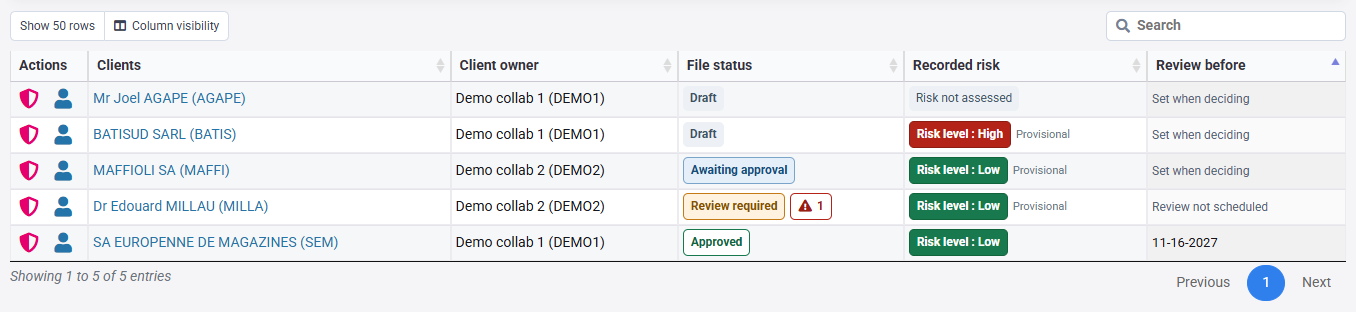
Go to Clients > AML due diligence. The portfolio defaults to ongoing relationships based on each client’s departure date. Choose All relationships or Ended relationships to review the past. Tiles open preparation, pending decisions, reassessment, overdue or upcoming reviews and alerts. Priorities overlap, so their counts must not be added together. If the entry is missing, have AML activation and your access rights checked.

In the Actions column, select the shield to open the file in the client record’s AML tab. The client name and person icon open the general client record. The file’s Portfolio AML monitoring link returns to the original relationship scope and filters.
Prepare, decide and monitor
The Prepare / Submit / Decide / Monitor and reassess timeline locates the file in its workflow. What to do next points to the relevant check or command for the current status and your permissions.
Open a client to document identification, relevant people, beneficial owners and four risk factors. One client file is shared across engagements. Submit the preparation to an authorised approver, then monitor the relationship. Significant changes require review before the next scheduled date when necessary.

Keep the professional checks in view
Tempolia checks entries, organises decisions and retains their history. Your organisation obtains and checks evidence, searches beneficial ownership, PEP and sanctions sources, assesses operations and maintains procedures and training. No external register or sanctions list is searched automatically. Start with client knowledge and risk assessment.
Reference sources
Code monétaire et financier - art. L. 561-2 / L. 561-3 · TRACFIN - professions du droit · TRACFIN - professions du chiffre · NPLAB
Client identification, including relevant beneficial owners, normally precedes the start of a business relationship. Open the client from AML due diligence in Tempolia.
Describe the relationship
In the client record’s AML tab, preparation shortcuts lead to Understanding the relationship, beneficial ownership and control, Parties checked, Documented risk classification and enhanced due diligence. Use them to reach the relevant fields and expand each Person block to complete its details.
In Understanding the relationship, choose legal entity or natural person and record the engagement purpose, actual activity, relevant countries and identification references. A company name alone does not describe the relationship. Save the preparation to retain entries; saving does not grant approval.

Gather evidence
The client collection link opens the existing document workflow, subject to your rights. Upload or request evidence there, then record references that let a reviewer find it: document, source, date or internal reference. A typed reference proves neither an upload nor authenticity.

Identify each relevant person
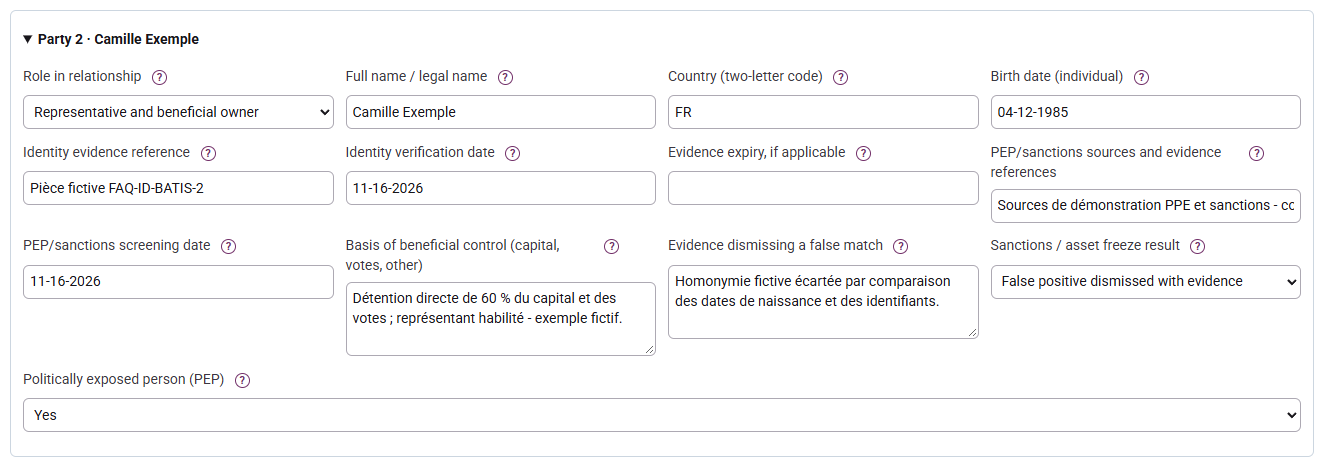
Keep one Client row, add the required representatives and beneficial owners, and record country, birth date for a natural person, evidence, verification date and applicable expiry. Use the combined role when a person is both representative and owner. The workflow supports twenty people/entities: refer larger files for review without removing required people to fit the limit. Continue with beneficial ownership.
Reference sources
A beneficial owner is a natural person. For a company, criteria include direct or indirect ownership exceeding 25% of capital or voting rights, or other legally defined control; other structures have their own criteria.
Document the search
From the portfolio, use the client’s shield to open the AML tab. The Beneficial owners and control shortcut leads to the identification basis; individual roles are entered further down under Parties checked.
Open AML due diligence, then beneficial ownership and control. Select the identification basis and record the register/source and evidence reference. Beneficial ownership register access requires authorisation; Tempolia does not query it automatically. Examine discrepancies and required follow-up under your procedure.

Separate the roles
Add the people concerned. Choose authorised representative, beneficial owner or the combined role, and explain the ownership or control identified. A director is not automatically a beneficial owner. Comments do not reconstruct an indirect ownership chain.
Explain special cases
Using the legal representative as a fallback is conditional, notably after unsuccessful searches and without suspicion: document the applicable conditions. In Tempolia, justify this basis and include at least one combined-role person. A natural-person client uses Not applicable. The listed-company exception also requires justification. Continue with PEP and sanctions searches.
Reference sources
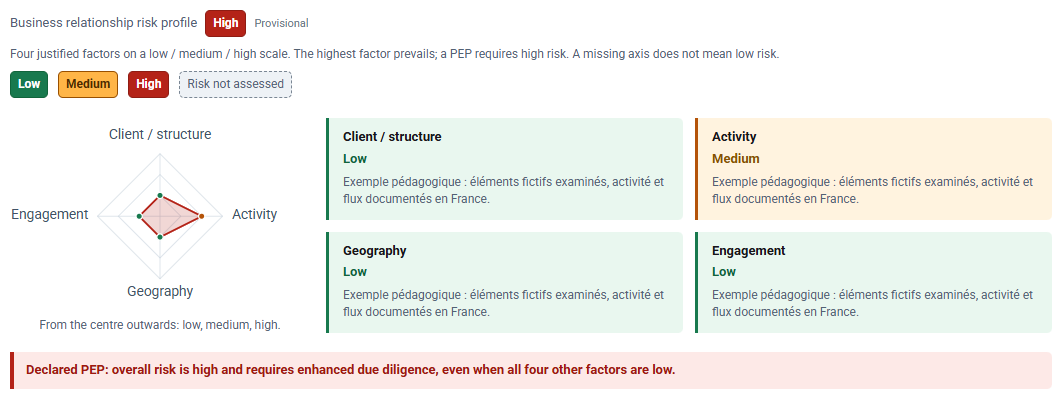
The risk profile combines four justified factors: client/structure, activity, geography and engagement. It explains an assessment rather than replacing professional judgement.
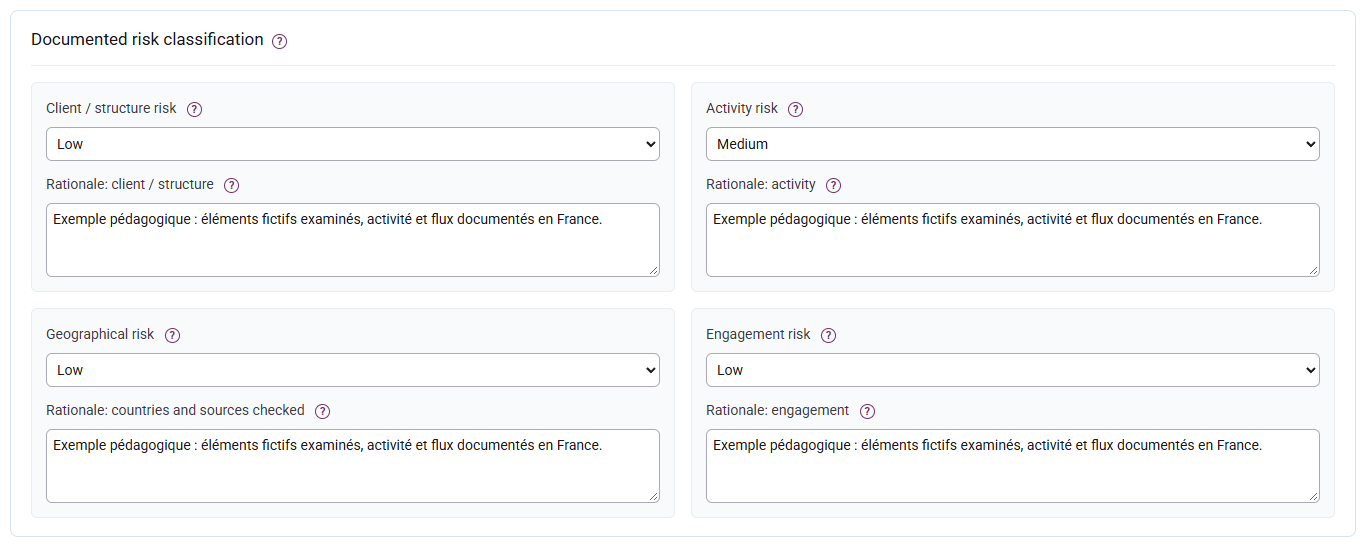
Record a level and its rationale
The Business relationship risk profile and radar appear in the summary at the top of the file, alongside the status and review deadline. Enter the four levels and their reasons further down under Documented risk classification. The radar remains visible for an unassessed file.
Choose Low, Medium or High for each factor and document the facts, dated sources and reasons. Missing does not mean low. A draft without any factor or PEP remains unassessed; save the information before submission.
Green indicates low risk, orange moderate risk and red high risk. Grey means that risk has not been assessed; it does not mean low risk. Risk colours remain separate from the file status: an approved relationship may have high risk.
Read the radar and overall level
Moving outwards, the three positions mean low, medium and high, not percentages. The polygon closes only when all four axes are recorded. Tempolia takes the maximum without an offsetting average; a PEP requires high risk even if the four axes are low. The preview updates while typing and flags unsaved entries.
Adapt due diligence
Low risk retains standard due diligence in this workflow. High risk requires source of funds, enhanced measures and a monitoring plan; a PEP also requires source of wealth. A different authorised approver must decide. Default review caps of 365 / 180 / 90 days are configurable internal rules, not universal legal deadlines. See decisions and monitoring.
A PEP is a natural person exposed through functions defined by the applicable rules, including relevant relatives and associates. A company is not itself a PEP. PEP status does not mean sanctions apply or an offence occurred.
Record actual searches
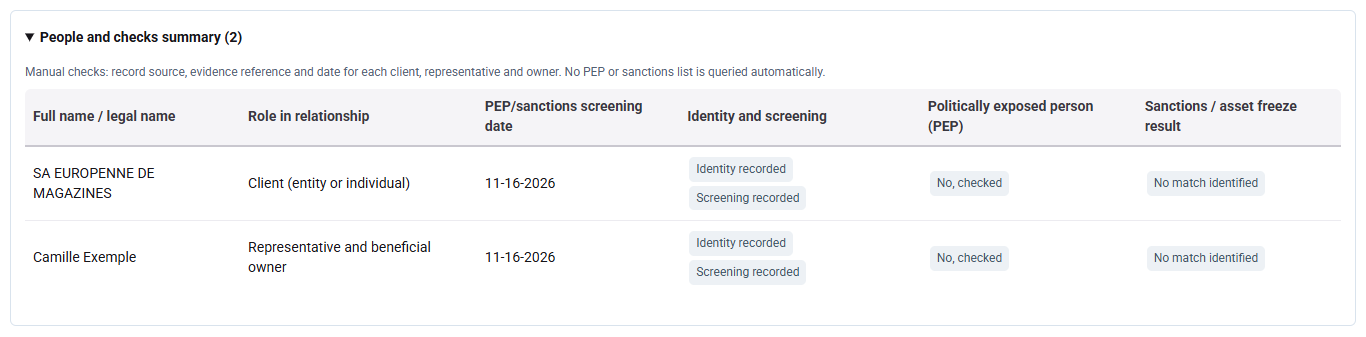
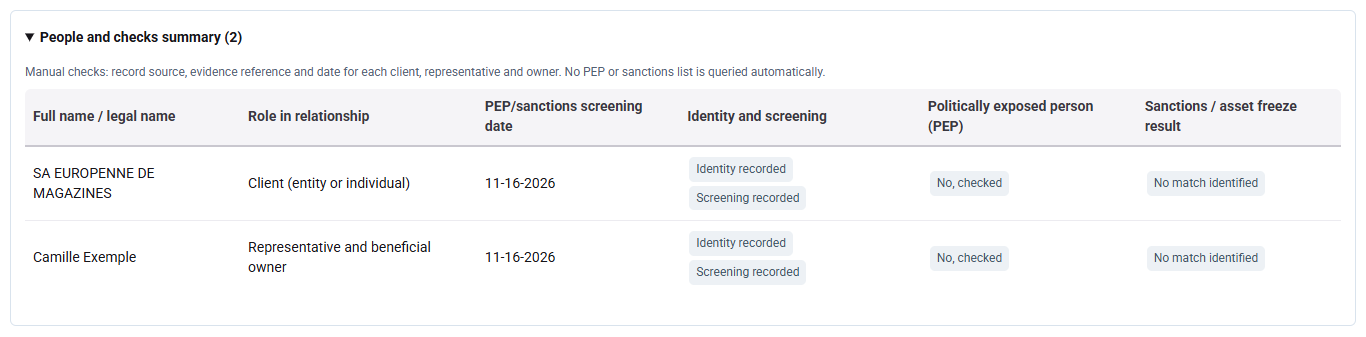
Expand People and checks summary to review the recorded roles, dates and results. To complete or correct a search, open the corresponding person in the preparation; submitted or approved files show their preparation under Information and evidence reviewed.
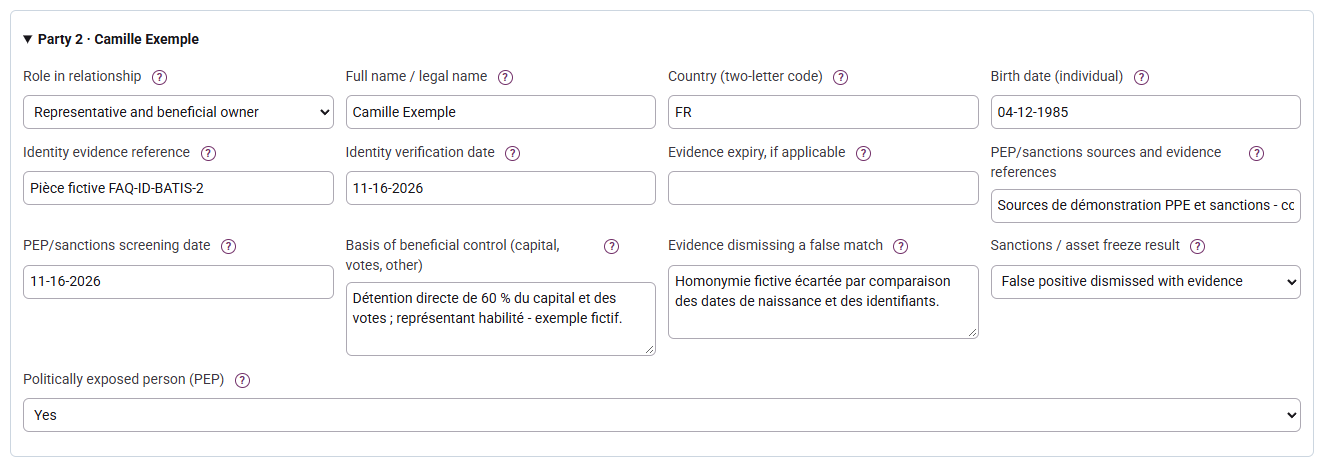
For each person or entity, enter the source, evidence reference and search date. Select PEP and sanctions results after a real check: Tempolia does not search names. The summary shows recorded controls and anomalies, not certified results.
Resolve a potential match
A potential or confirmed match blocks approval in the workflow. Examine identifiers and sources; for a false positive, choose the dismissed result and provide at least twenty characters of reasoning. Do not select “no match” to bypass an unchecked alert. Searches must meet the configured freshness at submission and decision, thirty days by default.
Complete the PEP case
A PEP sets high risk in Tempolia: document funds, wealth, enhanced measures and monitoring, then seek a different authorised approver. The PEP decision belongs to an executive or a person specifically authorised for that purpose. Report later events through ongoing monitoring.

Reference sources
Preparation and decision are separate steps. AML reading, editing, approval and export rights can differ; ask the administrator to check a missing action.
Save before submitting
In the client’s AML tab, follow the timeline and What to do next. Their links lead to preparation, submission, decision or events according to the file status and your permissions. On a submitted file, Information and evidence reviewed lets you review the preparation.
Complete the reported controls, save the preparation and submit when admissible. Save unsaved changes first. Expired evidence, unresolved alerts or changed identity prevent submission. Submission retains a snapshot of the preparation.

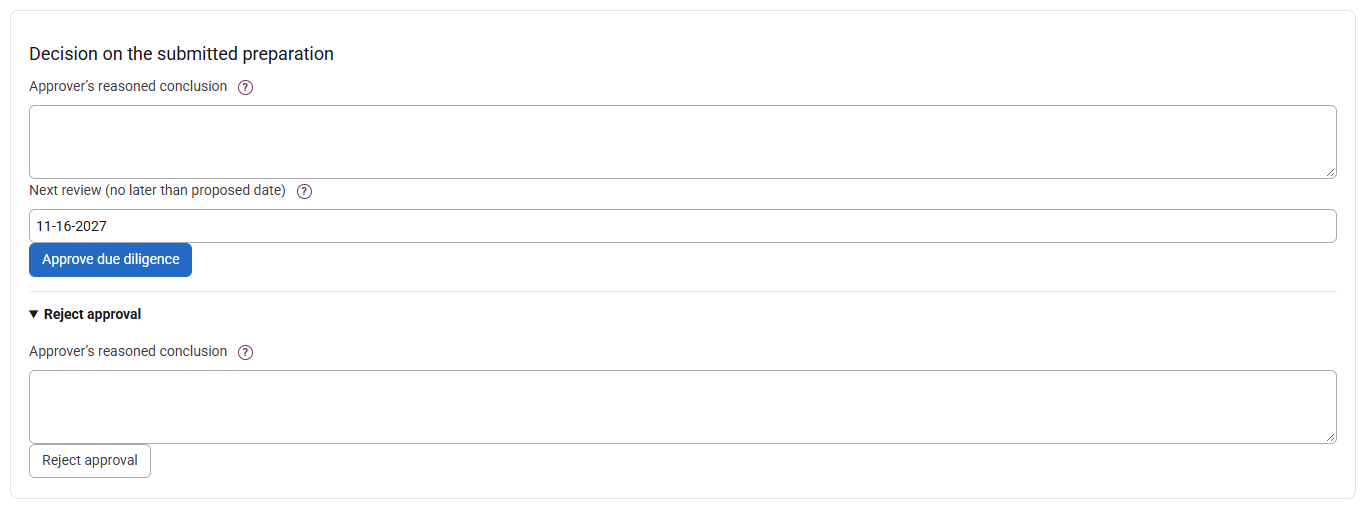
Record a reasoned decision
The approver reviews evidence and enters a note of at least ten characters, then approves or rejects. If more preparation is needed, use Return for preparation with a reason: this differs from rejection and gives the approver no editing rights. Approval uses a review date no later than the calculated cap; an earlier date is possible. For high risk, no contributor to the current preparation cycle may approve the file themselves.
Reopen without erasing
After submission, approval or rejection, reopen with a reason of at least ten characters. Review and save the information before submitting again. Previous decisions remain in history; reopening does not renew approval, and resolving an alert does not reinstate it. AML checks are shared with engagement-letter workflows that use them.

Due diligence continues throughout the relationship, using updated client knowledge and appropriate examination of operations. A review deadline is not a reason to postpone action on a relevant event.
Choose a priority
Open AML due diligence and select a tile. Reassessment needed groups unusable approvals, inconsistent states and legacy attestations to revisit; a rejection keeps its separate status. Overdue includes the deadline day; Within thirty days covers future dates up to that limit. Multiple alerts count as one client in the alerts tile. An unscheduled review is not an up-to-date review.

Refine the list
Search covers the client’s name or code and the client owner’s name or code. The Client owner shown in the list is not automatically the AML approver. The shield in Actions opens the client record’s AML tab; Portfolio AML monitoring then returns to the filtered worklist.
Combine status, priority, recorded risk and search. Choose Ongoing relationships, All relationships or Ended relationships: counts and the CSV use that same scope. Table filters do not change its counts. Preparation risks may be provisional. Approved appears only while the approval checks remain satisfied; changes to identity or engagement scope can require review.

Report and resolve
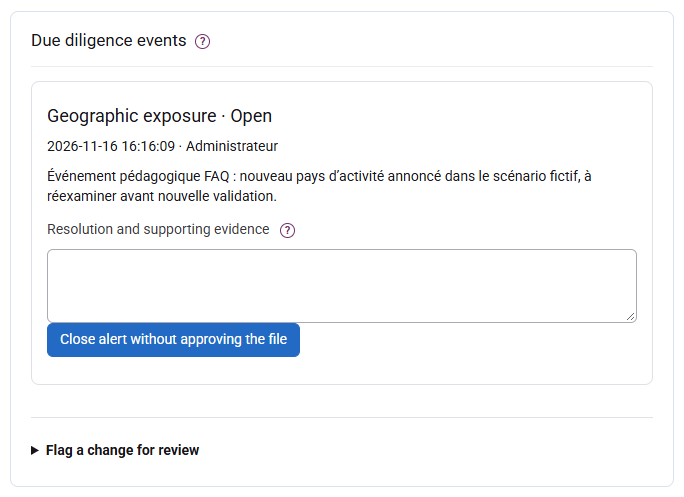
Record an identity, ownership, PEP, sanctions, geography, operation or other event and the relevant facts. Reporting invalidates current approval while retaining history. An authorised approver resolves the event with at least twenty characters of reasoning; the file must then be reviewed and approved again. Do not record the existence of a TRACFIN report in this ordinary monitoring area.
Reference sources
Traceability should let a reviewer find the information examined and decisions taken. Supporting documents, the current file and historical decisions complement one another.
Review history
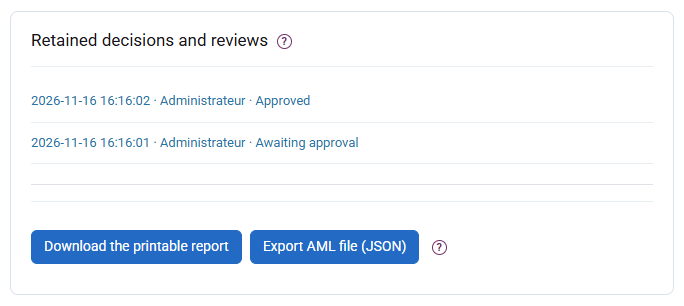
In the client record, open the AML tab, scroll to Retained decisions and reviews and select the review to read. On a submitted or approved file, Information and evidence reviewed describes the current preparation; each historical entry retains its own snapshot.
Open the client in AML due diligence and consult a historical decision. It retains its preparation, author, dates and reasoning. Current corrections or a new review do not rewrite earlier decisions. SHA-256 fingerprints check recorded content without authenticating external evidence.
Export a report
Subject to your rights, download JSON or the HTML report. HTML opens offline and can be printed or saved as PDF through the browser; it includes the risk profile, people, decisions and events. Referenced supporting documents are not attached: retain them in the document workflow with matching references.

Organise retention and confidentiality
Subject to stricter requirements, the French framework provides five years after the relationship ends for relationship and due-diligence information, and five years after execution for operations. These periods do not start at data entry. Organise access, backups and evidence retention; no automatic purge is performed here. A TRACFIN report, its existence and follow-up stay outside the ordinary client file and exports.
Reference sources
The CNOEC questionnaire assesses the practice’s exposure. It differs from a client questionnaire and risk assessment: a portfolio of approved client files is not enough to complete it.
Prepare the figures
First choose the portfolio scope: Ongoing relationships, All relationships or Ended relationships. The questionnaire summary uses that scope and your account permissions, independently of detailed table filters. AML guide and references brings together the workflow, example situations and regulatory references; it is also available at the end of each file.
In AML due diligence, open the firm exposure questionnaire section and export the CSV summary if authorised. It includes the date, accessible clients, preparations, deadlines, alerts and recorded risks. Categories can overlap and draft risks remain provisional. A restricted user does not export the entire firm’s figures.

Complete the firm’s organisation
Gather the practice risk map, procedures, responsibilities, permissions, training and internal controls separately. File guidance distinguishes obligations from Tempolia’s internal policy. Answer the official questionnaire using the scope and dates requested by the campaign. The Tempolia summary is neither a complete answer nor an official filing.
Train the people implementing the framework
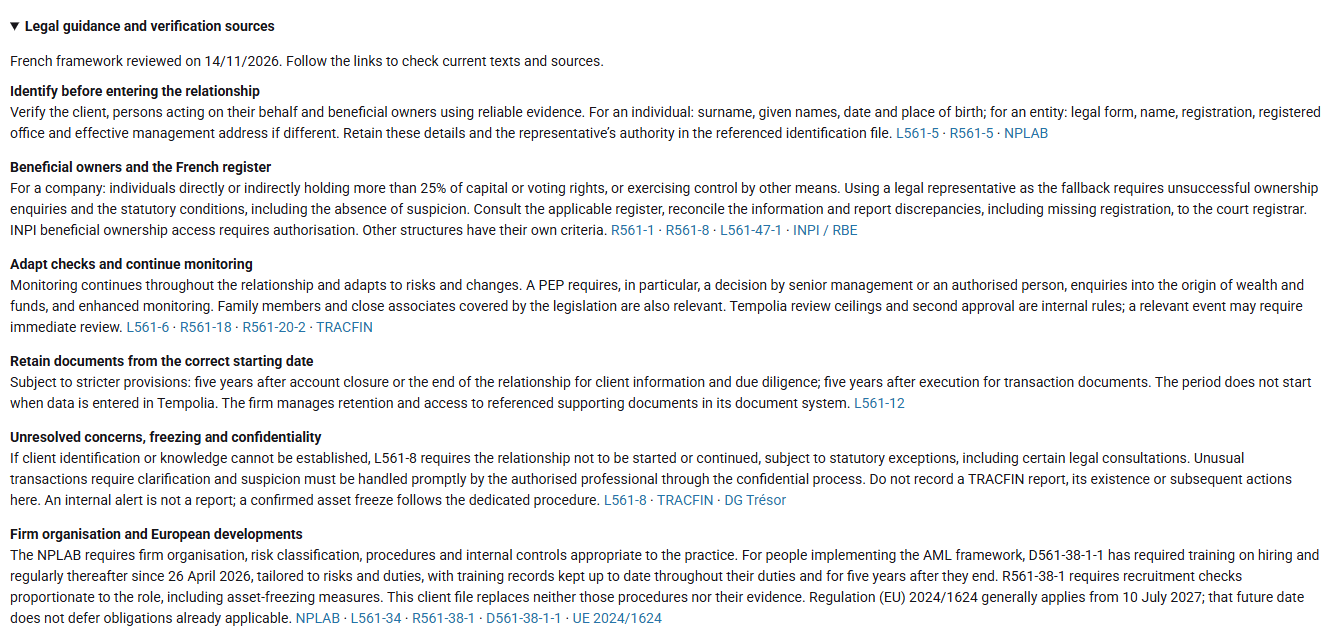
In a French accountancy practice, people implementing AML obligations must receive training on hiring and regularly thereafter. Since 26 April 2026, D561-38-1-1 specifies that training covers due diligence, asset freezing, penalties for breaches and recognising transactions potentially involving money laundering or terrorist financing. Tailor content and frequency to the practice’s risks and the relevant people’s duties, activities and hierarchical positions.
Document recruitment and retain training records
For people implementing the AML framework, R561-38-1 requires recruitment checks strictly proportionate to the risks of the role, taking duties, activities and hierarchical position into account. In particular, check that they are not subject to asset-freezing measures. Keep procedure references and evidence within the practice’s authorised internal process; a client file is not a recruitment file.
Keep mandatory training records up to date throughout the relevant people’s duties and for five years from the end of those duties. This starting point differs from the end of a client relationship. To prepare the questionnaire, gather, for example, dates, programmes, people trained and certificates or other available evidence, so training content and frequency can be retrieved for a control. The AML CSV summary is not a training register and does not retain those documents for you.
Check before answering
Reconcile figures to the actual population and explain unassessed files, deadlines and alerts. Check current CNOEC instructions rather than automatically reusing an old campaign. Use AML priorities to prepare client files requiring review.
Reference sources
Training and record retention - D561-38-1-1 ; Recruitment - R561-38-1 ; Decree of 24 April 2026 ; CNOEC - questionnaire d’exposition